


Use case 3: Identity resolution
Value statement
Lytics Identity Resolution provides a single, unified view of every customer, seamlessly stitching together anonymous behavioral data (like site clicks and content views) with known identifiers (such as email or user ID) across all devices and channels. This capability transforms fragmented, siloed interactions into a persistent, comprehensive customer profile. By resolving identity upon the very first known interaction, it ensures personalization is relevant from day one, maximizing customer lifetime value and enabling continuity of experience regardless of where or when the customer engages with your brand.
How to activate
Lytics captures email addresses as a primary mechanism for Identity Resolution. When a previously anonymous user submits an email address (e.g., via a lead form, newsletter sign-up, or login), the Lytics JavaScript Tag (JSTag) or SDK transmits this known identifier to the platform. This email address becomes the primary key for recognizing the user across future sessions and channels. Read more about Identity Resolution.
Capturing an Email: There are many ways to capture email or an identifier from your web stream using Lytics. In this case it’s as simple as attaching jstag.send({email: inputValue}); on a form on your website. If you don’t want to dig into a codebase you can utilize the Pathfora SDK and the experiences functionality in Lytics. This document can walk you through building an experience to capture email input. Refer to these docs on how to create an email targeting form:
Note: The screenshots provided for this use case were uploaded but are not yet resolvable to asset UIDs in the stack DAM, so they cannot be embedded in this JSON RTE field at this time.
Verify email was captured: Navigate to Building Profiles → Search in your Lytics Account. Change the dropdown bar on the right-hand side to the email identifier, then search for an email address that has been identified.
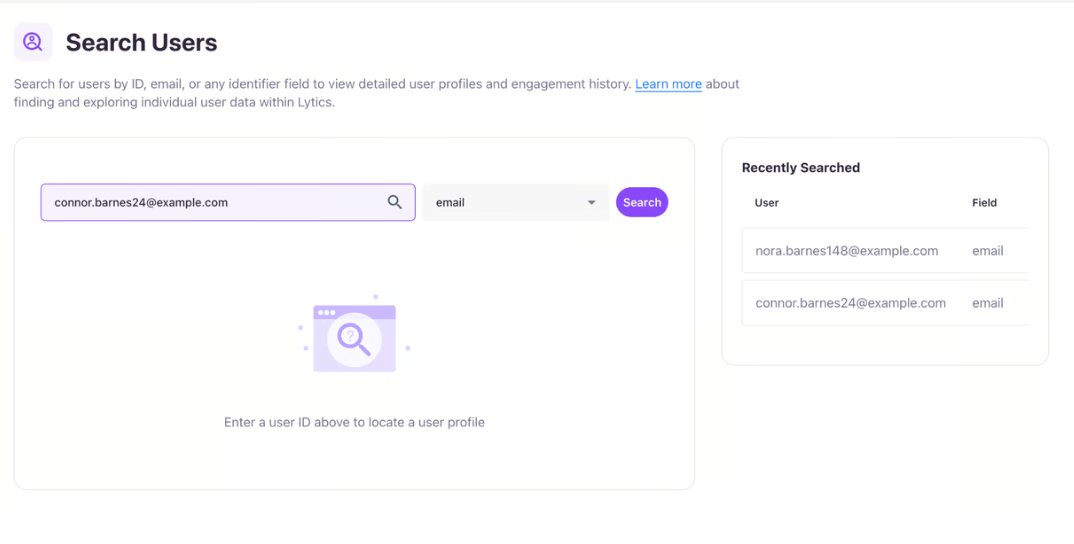
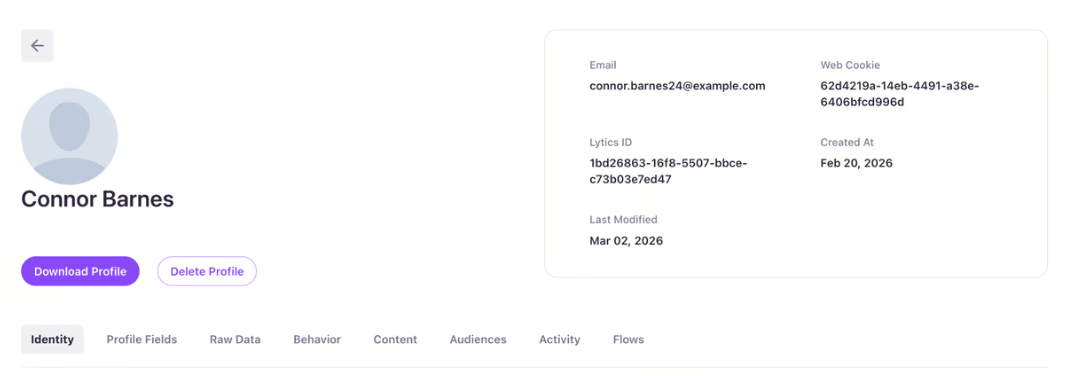
Validate (recommended): Submit a test email, then confirm the profile is searchable by email and that prior anonymous behavior is now associated with the resolved identity.