Understanding the Veda Content Model


Once the app runs, the next thing to understand is the shape of the content itself. This is where Contentstack starts to feel different from a simple data fetch exercise. Veda works because the content model already encodes relationships, reusable structures, and route-friendly fields.
What you'll learn
Which content types Veda uses and what each one is responsible for
How modular blocks fit into page composition
How the content types relate to one another
Why the model supports both flexible pages and purpose-built product experiences
How editors and developers divide responsibilities inside this model
The main Veda content types
Before we go content type by content type, here is a compact developer-oriented view of the core Veda models.
Content type | Main purpose | Key props in the Veda types | Frontend use |
|---|---|---|---|
page | Flexible marketing and editorial pages | title, url, description, image, components, $ | Catch-all page routes render it through ComponentsRenderer |
product | Individual catalog item pages | title, url, short_description, description, price, category, product_line, media, taxonomies, $ | Product page, breadcrumbs, related lists, filtering context |
product_line | Collection or line-level landing page | title, url, description, image, products, taxonomies, $ | Collection pages and featured product groupings |
category | Browsing-oriented grouping | title, url, description, media, products, taxonomies, $ | Category pages and product discovery |
header | Shared global navigation content | title, logo, links, $ | Mega menu and shared site chrome |
What the most important props really mean
Prop | Meaning in practice | Why it matters |
|---|---|---|
url | Canonical path stored in content | Lets the frontend resolve routes from content instead of hardcoded IDs |
components | Array of modular blocks such as hero or rich_text | Powers flexible page composition |
category / product_line | Reference arrays to related entries | Enables breadcrumbs, related products, and richer page context |
media / image / logo | Asset references | Keeps images and media in Contentstack instead of the codebase |
taxonomies | Structured classification terms | Supports filtering and grouping without custom hardcoded logic |
$ | Preview/edit metadata bindings | Lets Live Preview and Visual Editor map UI elements back to fields |
page
Veda implementation: The page content type powers the more flexible, content-composed parts of the site.
This is usually where modular blocks do their most visible work. A page entry can describe a route such as / or another marketing-style URL and assemble its content from a series of reusable sections.

product
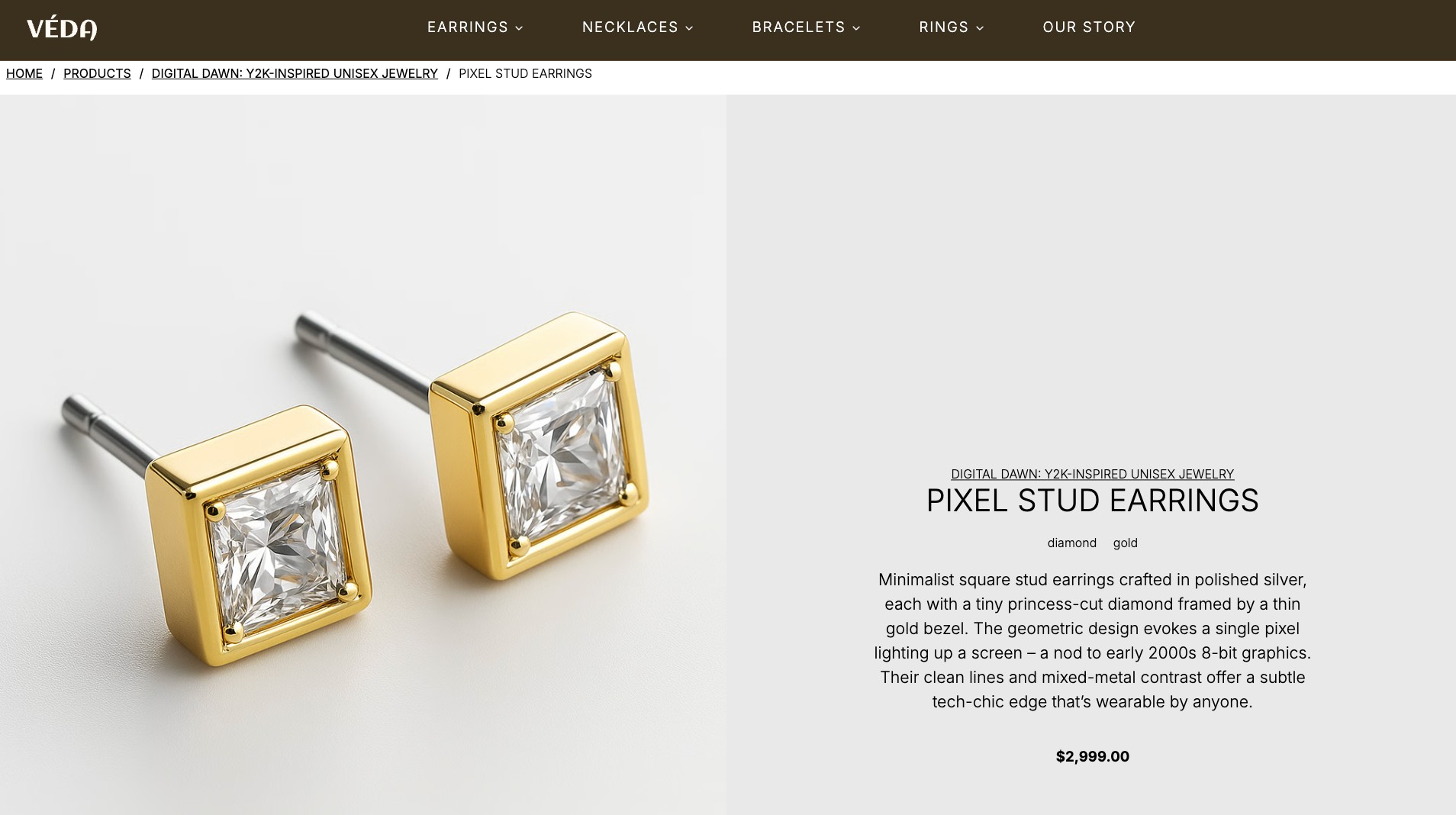
Products represent individual catalog items. They carry the sort of data you expect a product experience to need:
title
URL
media
short descriptive content
taxonomy-related data
product-specific display information
product_line
Product lines group products into larger branded collections. In Veda, this supports richer merchandising and collection storytelling instead of treating the catalog like one flat list.

category
Categories represent browsing-oriented groupings. These are useful for navigation and product discovery because users do not always browse by brand story alone.
header
The header content type supports shared navigation data and helps the frontend render consistent global navigation without hardcoding it into the app.
How these content types relate to each other
This is the simplest way to picture the Veda model:
This is not trying to show every field. It is showing the relationships that matter most when you read the frontend code:
pages are block-driven
navigation is shared content
products sit inside broader browsing structures
assets and taxonomy data are part of the content model, not bolted on later
What the API data looks like in practice
Veda implementation: One of the nicest things about the Veda repo is that the TypeScript interfaces make the expected Contentstack response shape much easier to understand.
Here is a trimmed version of the current Page and Product types from lib/types.ts:
export interface Page extends SystemFields {
  title: string;
  url?: string;
  description?: string;
  image?: File | null;
  components?: Components[];
  $?: {
    title?: CSLPFieldMapping;
    url?: CSLPFieldMapping;
    description?: CSLPFieldMapping;
    image?: CSLPFieldMapping;
    components?: CSLPFieldMapping;
  };
}

export interface Product extends SystemFields {
  title: string;
  url?: string;
  short_description?: string;
  description?: string;
  price?: number | null;
  category?: Category[];
  product_line?: ProductLine[];
  media?: File[] | null;
  taxonomies?: Taxonomy[];
  $?: {
    title?: CSLPFieldMapping;
    url?: CSLPFieldMapping;
    short_description?: CSLPFieldMapping;
    description?: CSLPFieldMapping;
    price?: CSLPFieldMapping;
    category?: CSLPFieldMapping;
    product_line?: CSLPFieldMapping;
    media?: CSLPFieldMapping;
    taxonomies?: CSLPFieldMapping;
  };
}
That tells you a lot right away:
Page is built around flexible modular content in components
Product is a richer detail shape with relationships to category and product_line
both can carry a $ object for preview/edit bindings
How to read the Veda types as a developer
Veda implementation: The most useful habit here is to treat each interface as a contract between Contentstack and the React app.
For example:
required-looking fields such as title: string are fields the frontend expects to exist for a healthy render
optional fields such as description? or media? are fields the frontend can handle conditionally
arrays such as product_line?: ProductLine[] mean the content type is relational, not isolated
nested objects like image?: File | null tell you the frontend expects fully resolved asset objects, not just asset IDs
That means the TypeScript file is doing two jobs at once:
documenting the content model
documenting the data shape the components are built around
A mental model for the response payload
Contentstack concept: The Delivery SDK eventually gives you normal JavaScript objects. The TypeScript interfaces are not the payload themselves, but they are a strong guide to the payload shape.
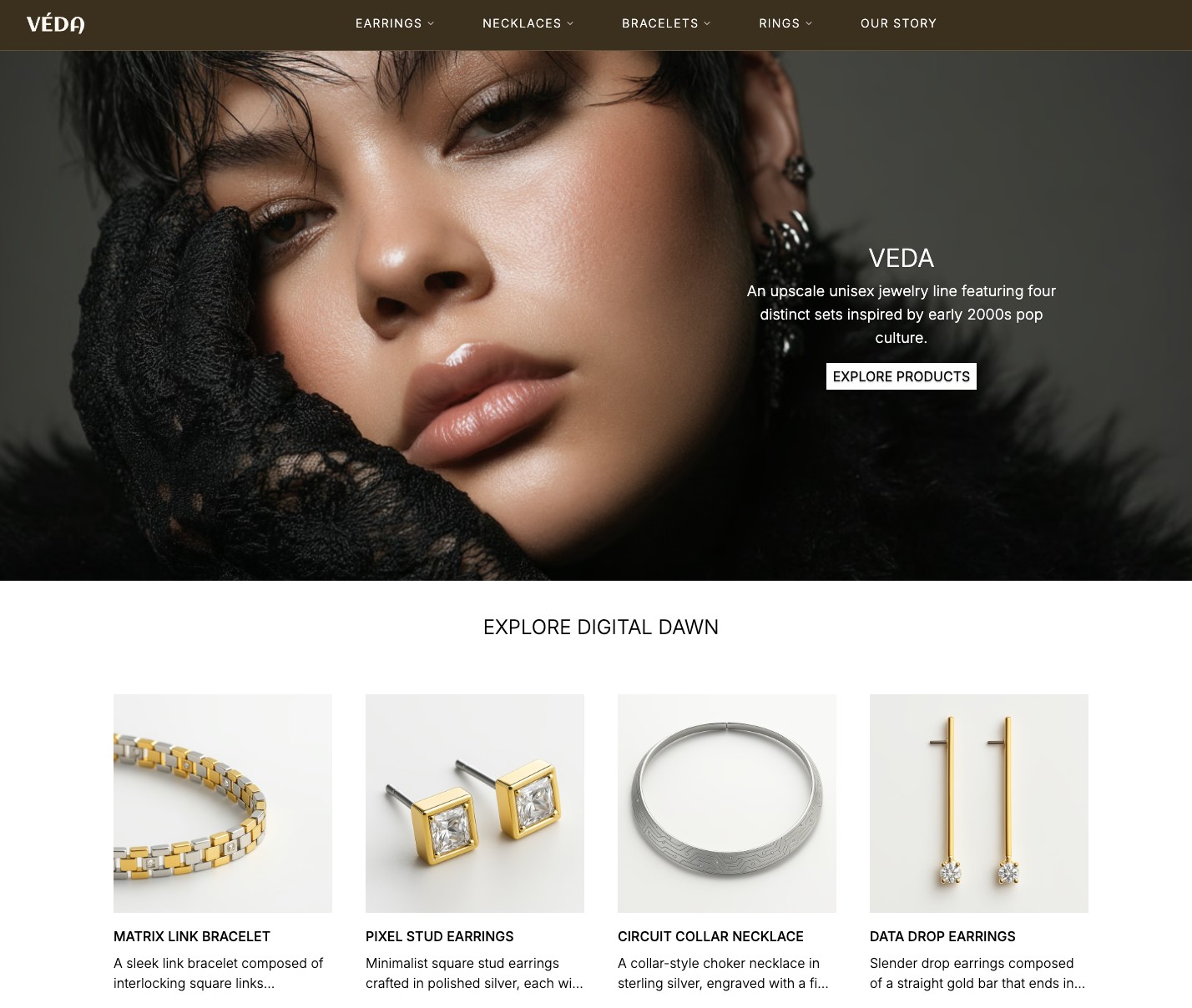
A page entry fetched for a route like / will look roughly like this:
{
  "uid": "blt-page-home",
  "title": "The Revival Collection",
  "url": "/",
  "description": "Luxury jewelry with modular content sections.",
  "image": {
    "uid": "blt-asset-hero",
    "title": "Homepage hero",
    "url": "https://images.contentstack.io/v3/assets/..."
  },
  "components": [{
    "hero": {
      "title": "The Revival Collection",
      "description": "An upscale unisex jewelry line",
      "image": {
        "url": "https://images.contentstack.io/v3/assets/..."
      }
    }
  },
  {
    "list": {
      "title": "Explore the collections",
      "reference": [{
        "title": "Digital Dawn",
        "url": "/products/digital-dawn"
       }]
      }
    }]
  }
This is not a copy-pasted live response. It is an inferred shape based on the Veda types and query behavior. The important part is the structure:
system fields such as uid
content fields such as title, url, and description
nested asset objects
modular blocks represented as keyed objects inside the components array
Why the modular block array looks a little unusual
Veda implementation: The components field is not just an array of identical objects. Each item is a one-key object whose key identifies the block type:
[{ "hero": { "...": "..." } },{ "rich_text": { "...": "..." } },{ "media": { "...": "..." } }]That design is the reason Veda needs a central renderer. The renderer inspects the key, then decides which React component to use.
What the $ field is for
Contentstack concept: The $ object is preview-oriented metadata added by the frontend utility layer so rendered elements can be linked back to content fields during editing.
Readers often see $ in the Veda code and assume it is normal published content. It is better to think of it as editor-facing metadata attached to the content object for Live Preview and Visual Editor behavior.
That means:
title is content
$?.title is field-binding metadata about that content
Both matter, but they serve different audiences.
Why this model is stronger than a single "page" schema
Contentstack concept: A common beginner mistake is to overuse one generic content type for everything.
That can work for small demos, but it breaks down fast. Product detail pages, collection pages, and generic editorial pages often have different rendering needs, different data relationships, and different editorial expectations.
Veda avoids that trap by modeling content domains separately while still allowing flexible composition where it makes sense.
Modular blocks in Veda
Veda implementation: The current Veda materials describe these core modular blocks:
hero
list
two column
media
rich text
Here is the developer-facing summary of those block props:
Block type | Key props | What the block is good for |
|---|---|---|
hero | title, description, ctas, image, video, design | Top-of-page storytelling and visual entry points |
list | title, description, reference, cards, load_first_image_eager | Featured collections, related products, grouped content |
two_column | side_a, side_b | Structured paired layouts without hardcoding a one-off page |
media | image, width, height, crop, widths | Image-led sections with delivery and layout hints |
rich_text | title, content, alternative_content, ctas | Editorial copy blocks with optional call-to-action support |
This is one of the most important ideas in the guide.
The content model does not say, "Editors can build anything." It says, "Editors can build anything from this approved set of structured building blocks."
That is the right kind of flexibility. It creates freedom without turning the frontend into an unbounded renderer.
Full component inventory from the Veda types
Veda implementation: The Veda repo has both top-level page-builder blocks and smaller supporting component shapes nested inside those blocks. This table helps you read lib/types.ts without having to guess which pieces are page sections and which pieces are sub-objects.
Type or component | Kind | Key props | Why it exists |
|---|---|---|---|
Hero | Top-level modular block | title, title_tag, description, ctas, image, video, design | Hero section with copy, CTA, and media support |
List | Top-level modular block | title, title_tag, description, load_first_image_eager, reference, cards | Reusable listing block for product references, cards, and grouped content |
TwoColumn | Top-level modular block | side_a, side_b | Two-column layout that can hold other nested content objects |
Media | Top-level modular block and nested media object | image, width, height, crop, widths | Structured image block with rendering hints |
RichText | Top-level modular block and nested editorial object | title, title_tag, content, alternative_content, ctas | Rich editorial content with optional CTA support |
Card | Supporting nested component | title, description, image, link | Small repeatable promo or summary unit inside a list |
Cards | Supporting wrapper object | card | Gives the list a repeatable array of card objects in the Contentstack schema |
Cta | Supporting nested component | text, link | Reusable call-to-action shape |
Ctas | Supporting wrapper object | cta | Lets a hero carry one or more CTA items in a structured way |
SideA | Supporting nested layout item | list, media, rich_text | Defines the allowed content shapes inside each column |
Components | Top-level modular block union object | hero, list, two_column, media, rich_text | The union-like content structure the renderer inspects block by block |
Links | Supporting navigation component | label, item, reference, featured_product, show_product_lines, show_all_products_links | Structured nav link definition used by the mega menu |
PageHeader | Supporting reference wrapper | reference | Reference container for header content when header data is modeled as referenced content |
Link | Shared value object | title, href | Generic link shape reused across the content model |
File | Shared asset object | title, url, description, dimension, publish_details | Standard Contentstack asset payload used throughout the app |
How to interpret this table
The top-level page-builder blocks are Hero, List, TwoColumn, Media, and RichText
Wrapper types like Cards and Ctas exist because Contentstack schemas often model repeatable nested items through small wrapper objects
Shared objects like Link and File are not page sections by themselves, but they appear all over the content model and are essential to understanding the payload shape
Components is especially important because it is the type that lets page.components hold different block kinds in one array
If you are trying to understand what the renderer is doing, focus first on Components, then on the five top-level blocks, then on the nested helper types those blocks use.
How the content types relate to each other
The real power of Veda is not the list of content types. It is the fact that those types work together.
Veda implementation: From the repository and guide materials, you can see patterns like these:
pages use modular composition
header data is fetched alongside page-level content
product lines and categories support dedicated route experiences
product filtering uses taxonomy-aware logic
richer queries often include related content instead of treating entries as isolated records
This is why the Veda repo uses deeper include behavior in its fetch layer. The app is not merely asking for a title and body. It is asking for connected content that can support a full page experience.
A concrete relationship example from product data
Veda implementation: The Product type tells you that a product payload is not flat. It can include related categories, product lines, media arrays, and taxonomy data:
export interface Product extends SystemFields {
  title: string;
  url?: string;
  price?: number | null;
  category?: Category[];
  product_line?: ProductLine[];
  media?: File[] | null;
  taxonomies?: Taxonomy[];
}
So a product response can look conceptually like this:
{"title": "Silver Orbit Ring","url": "/products/digital-dawn/silver-orbit-ring","price": 240,"category": [
    { "title": "Rings", "url": "/category/rings" }],"product_line": [
    { "title": "Digital Dawn", "url": "/products/digital-dawn" }],"media": [
    { "url": "https://images.contentstack.io/v3/assets/..." }],"taxonomies": [
    { "taxonomy_uid": "materials", "term_uid": "silver" },
    { "taxonomy_uid": "product_type", "term_uid": "ring" }]}
That is why catalog features like breadcrumbs, related listings, and filters can work without hardcoded lookup tables in the frontend.
What editors control versus what developers control
Contentstack concept: Good Contentstack architecture makes the editor/developer boundary obvious.
Editors control:
entry values
page composition using allowed blocks
ordering of sections
text, media, and content relationships within the defined schema
Developers control:
the content type schema itself
which blocks exist
how each block renders
how URLs map to routes
how queries fetch and normalize data
That is a healthy collaboration model. Editors gain flexibility without silently changing the application's architecture.
Why Veda is a good teaching model
Veda implementation: Veda demonstrates that a project can mix:
flexible content-composed pages
dedicated page templates for important content types
shared navigation content
catalog-oriented data behavior
That blend is exactly what many production sites need. Not everything should be one generic block page. Not everything should be one rigid template either.
Questions to ask when adapting this model
As you study the Veda model, keep these questions in mind:
Which content types in my project deserve dedicated page templates?
Which content should stay modular and editor-composed?
Which fields need stable URLs?
Which relationships are editorially meaningful enough to model as references?
Which repeated page patterns should become modular blocks instead of duplicated fields?
Those questions matter more than copying Veda field-for-field.
Key takeaways
Veda uses multiple content types because multiple page behaviors exist in the site
page handles flexible composition, while product-oriented types support more purpose-built experiences
Modular blocks provide the right balance between editorial flexibility and frontend control
References and richer queries turn the model into a connected system instead of disconnected entries
The useful lesson is not to clone the exact schema blindly, but to understand why each content type exists
Frequently asked questions
What are the main Veda content types and what do they do?
Veda centers on page (modular marketing/editorial pages), product (catalog detail), product_line (collection landing), category (browsing group), and header (global navigation). Each type encodes both fields and relationships used by the frontend.
How do modular blocks work in Veda pages?
The page.components field is an array of one-key objects, where the key identifies the block type (for example hero or rich_text). A central renderer inspects the key and selects the matching React component.
Why does Veda store a url field in content?
The url field acts as the canonical path so the frontend can resolve routes from content rather than hardcoded IDs. It supports predictable routing for pages, products, and collection-like entries.
What is the $ field in the Veda types?
The $ object carries preview/edit field-binding metadata used by Live Preview and Visual Builder. It is not normal published content, but it is attached to content objects to map rendered UI back to fields.
How should developers read lib/types.ts in the Veda repo?
Treat each TypeScript interface as a contract for the expected Delivery API response shape. Required fields indicate render expectations, optional fields are handled conditionally, and arrays/references signal relational content.